Zlendo Realty Logo

AI Floor Planner

Design & Visualize in 3D

2D to 3D Converter

Instant floor plan conversion

Smart Room Styler

AI-driven interior styling

Interiors & Exteriors

Region-aware design intelligence

Smart Cost Estimator

Precise project budgeting

Vastu Optimizer

Ancient wisdom, modern tech

Realistic Renders

Photorealistic lighting visualization

Virtual Walkthrough

8K Ultra-realistic experiences

See all Products

Explore all our offerings

Floor Plan Design

Professional floor planning

2D to 3D Conversion

Transform your plans to 3D

Interior Design Services

Professional interior planning

Vastu Consultation

Expert Vastu guidance

Virtual Walkthrough Services

Immersive 3D experiences

Design Library

Inspiration gallery

Pre-built Templates

Built-in layouts for homes, rooms,...

Webinars

Live PropTech learning

Webinar Recordings

Watch on-demand sessions

Tutorials

Learn the platform

Help Center

Find answers & support

Blog

Insights & Updates

News

Industry Trends & Updates

Plans

Business Free Trial

Try enterprise features

Affiliate & Partner Program

Grow with Zlendo

Zlendo Realty API Suite

Grow your Business with Us

Business
Login Start For Free

Menu

AI Floor Planner 2D to 3D Converter Smart Room Styler Interiors & Exteriors Smart Cost Estimator Vastu Optimizer Realistic Renders Virtual Walkthrough See all Products →
Floor Plan Design 2D to 3D Conversion Interior Design Services Vastu Consultation Virtual Walkthrough
Design Library Pre-built Templates Webinars Webinar Recordings Tutorials Help Center Blog News
Plans
Business Free Trial Affiliate & Partner Program Zlendo Realty API Suite
For Individuals For Business
Login Start For Free

General

4
  • About Zlendo Realty 
  • How to Use the Zlendo Realty Help Center Documents
  • Zlendo Realty FAQ

Getting Started

2
  • Sign Up: Creating a Zlendo Realty Account 
  • Signing In 

Signing In

1
  • Signing In 

Password Change

1
  • Resetting Your Password 

Account

2
  • Sign Up: Creating a Zlendo Realty Account 
  • Payment & Billing

Account Setup

1
  • Sign Up: Creating a Zlendo Realty Account 

Payment & Billing

1
  • Payment & Billing

Dashboard

5
  • Zlendo Realty Dashboard: First-Time User Tour 
  • Creating New Projects
  • Find & Manage Projects
  • Zlendo Realty Community: Creating Project Templates & Sharing Designs
  • Payment & Billing

Zlendo Realty Editor

10
  • Workspace Tool Updates
  • 2D Draw Mode
  • 2D Edit/Modify Asset Properties
  • 3D Edit Mode
  • 2D Presentation Mode
  • Rendering
  • AI Inspiration
  • 2D Export
  • 3D Elevation Export
  • MEP and Structural

Cost Estimation

2

Vastu

1
  • Zlendo Realty Vastu Tool

FAQ

1
  • Zlendo Realty FAQ

Render

2

Community

2
  • Zlendo Realty Community: Creating Project Templates & Sharing Designs

Export Plan

1

Real-World Preview

1

Projects

10
  • Creating New Projects
  • Find & Manage Projects
  • Furniture & Decor

Project Workspace

9
  • Zlendo Realty Vastu Tool

Share Designs

2
  • Zlendo Realty Community: Creating Project Templates & Sharing Designs

Interior Design

5
  • Furniture & Decor

Project Workspace Settings

1

AI Inspiration

2

Creating New Projects

1
  • Creating New Projects

Find Projects

1
  • Find & Manage Projects

Manage Projects

2
  • Find & Manage Projects

Create Templates

2
  • Zlendo Realty Community: Creating Project Templates & Sharing Designs
View Categories
  • Home
  • Docs
  • Zlendo Realty Editor
  • 2D Presentation Mode

2D Presentation Mode

< 1 min read

2D Mode: Presentation Mode #
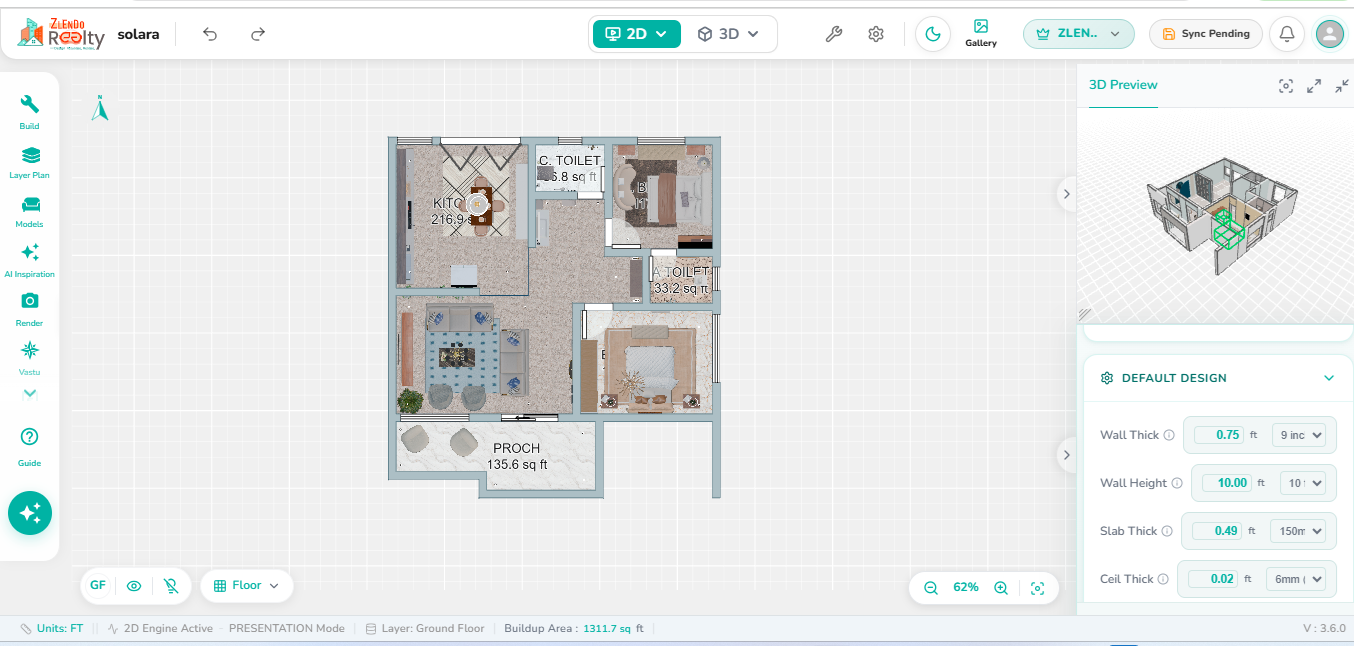
Floor plan displayed in Presentation Mode showing applied flooring materials, wall textures, furniture assets, and design elements with realistic visual representation.

Presentation Mode provides a visually enhanced view of the floor plan by displaying all applied textures, flooring materials, wall finishes, and furniture assets within the design. This mode offers a realistic representation of the project while maintaining the same editing and modification capabilities available in Draw Mode.

Users can select, edit, and modify design elements using the same tools and workflows as Draw Mode. The key difference is that Presentation Mode displays the actual visual appearance of materials, finishes, and placed assets, making it easier to review the overall design, verify material selections, and understand the final look of the space before rendering.

Updated on October 28, 2026

What are your Feelings

  • Happy
  • Normal
  • Sad

Share This Article :

  • Share
  • Facebook
  • X
  • LinkedIn
  • Pinterest
3D Edit ModeRendering

Powered by BetterDocs

Leave a Reply Cancel reply

Your email address will not be published. Required fields are marked *

Table of Contents
  • 2D Mode: Presentation Mode

Create your account today

Experience the future of AI home design for free.

Get Started
Zlendo Realty Logo

The world's first Design-to-Sales engine. Experience your space in 360° ultra-realistic 8K, AR/MR.

EINShield VAPT Secured

VAPT Secured

Products

  • AI Floor Planner
  • 2D to 3D Converter
  • Smart Room Styler
  • Interiors & Exteriors
  • Smart Cost Estimator
  • Vastu Optimizer
  • Realistic Renders
  • Virtual Walkthrough
  • See all Products →

Services

  • Floor Plan Design
  • 2D to 3D Conversion
  • Interior Design
  • Vastu Consultation
  • Virtual Walkthrough

Use Cases

  • Home Remodeling
  • Interior Design
  • Vastu Optimization
  • New Home Building
  • Commercial Spaces
  • Builder & Promoter
  • NRI & Remote Planning
  • Developer Solutions
  • Zlendo Realty API Suite

Resources

  • Design Library
  • Pre-built Templates
  • Blog
  • Tutorials
  • Help Center
  • News
  • Grow with Zlendo
  • Contact Us
  • About Us

Legal & Policies

  • General Terms
  • Community Guidelines
  • NDA For Vendors
  • Refund & Cancellation Policy
  • Service Level Agreement

Compare

  • Zlendo vs Foyr Neo
  • Zlendo vs Roomsketcher
  • Zlendo vs Coohom

Copyright © 2026 Zlendo Technologies Pvt. Ltd. | All Rights Reserved.

Cookie PolicyTerms & ConditionsPrivacy Policy
Contact Us

EDITOR DOCUMENTATION

Version 4.0 · Current
Older versions

Archived documentation

  • Version 2.0→
  • Version 1.0→